

By the end of this article you will be able to work out what your channel will cost in advance, top up your balance and find any charge in your history. It takes about 10 minutes to read.
There is no subscription. You pay tokens only for the work the service has done. The price of a paid action is shown on the button, or next to it, before you start.
What tokens are and what they cost
A token is the internal unit of payment. The rate is fixed:
- 100 tokens = 1 $ or 1 €;
- 1 token = 0.01 $ or 0.01 €.
There is no volume discount: 5,000 tokens cost exactly 50 times as much as 100. The balance is shared across all your projects. You can see it in the menu on the left under your name and on the dashboard in the "Balance details" card.
Free of charge: creating projects, connecting platforms, any settings, editing text by hand, publishing by hand and the video script.
Important. Until you top up for the first time, you are in the trial period. AI images, video creation and the "YouTube channel" source are closed during it — those buttons carry the "Not available during trial access" mark. Your first top-up opens these features.
Get free tokens
Right now you can get up to 1,000 tokens free. 50 arrive when you sign up, the rest come from your first steps in the service.
| Step | Reward |
|---|---|
| Sign-up (Telegram login or a confirmed e-mail) | 50 |
| Your first project | 50 |
| Your first connected platform | 100 |
| Your first source | 150 |
| Your first publication | 50 |
| 10 publications | 100 |
| 50 publications | 200 |
| 100 publications | 300 |
The "Achievements & Progress" card on the dashboard shows the list of steps and the current amounts. It has two groups: "Onboarding" and "Milestones & rewards". The reward arrives by itself the moment a step is done, and it appears in your operation history.
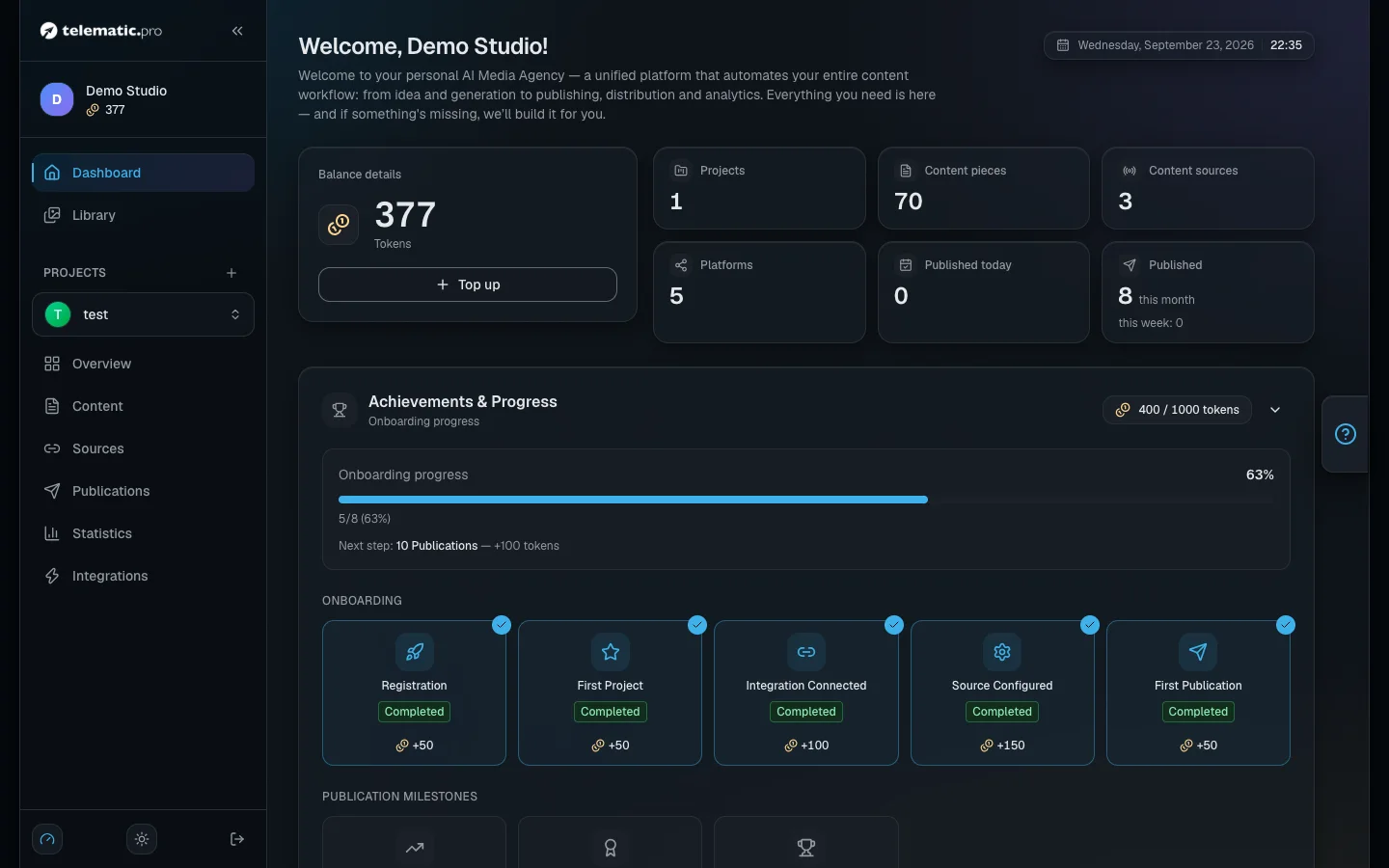
If you came through a friend's link, another 25 tokens are added to your starting 50.
Top up your balance
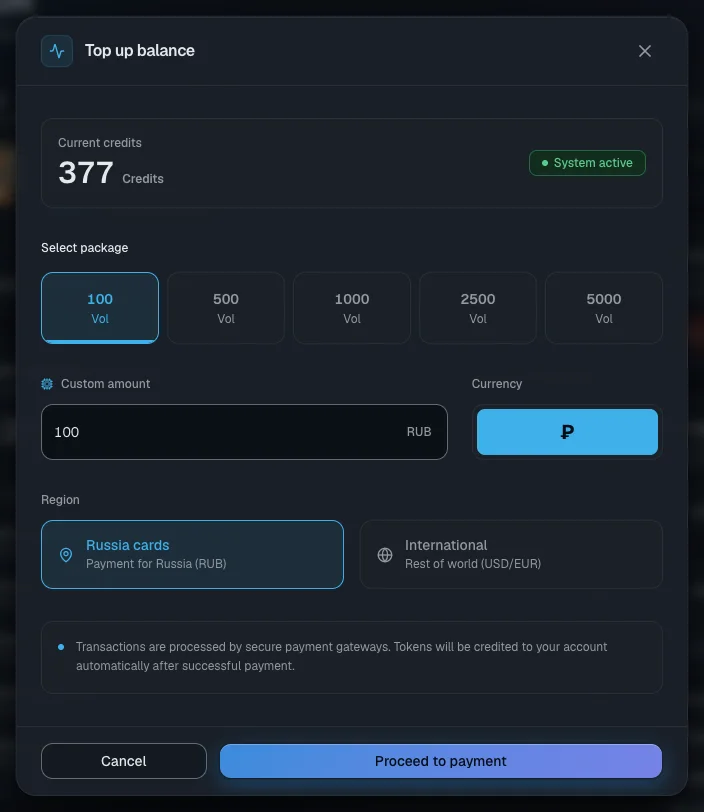
- On the dashboard click "Top up" in the balance card. The same button is on the "Account" page.
- In the "Top up balance" window choose "Region": "Russia cards" means paying in roubles through YooKassa; "International" means paying in dollars or euros through Stripe.
- For "International" choose "Currency".
- In the "Select package" block click one of the amounts: 100, 500, 1,000, 2,500 or 5,000 tokens. Or type your own in the "Custom amount" field. The minimum is 1 $ or 1 €.
- Click "Proceed to payment". The payment provider's page opens — pay there.
- After paying you come back to the "Account" page. The tokens arrive automatically and a "Balance top-up" line appears in the history.
Tip. There is no separate "payment successful" message on the page. If your balance does not change straight away, wait a minute and reload the page.
Price list: collecting items, texts and publications
Collection is charged for every item collected. Rewriting the text with AI is already included in the price.
| Collecting items | Tokens |
|---|---|
| "Telegram channel" | 1 per post |
| "RSS feed" | 1 per article |
| "Website (scraper)" | 1 per article |
| "Fixed URL" | 1 per run |
| "AI Aggregator" | 1 per roundup |
| "AI generator" | from 1 (depends on the model) |
| "YouTube channel" | 1 per minute of video; 1 for a video already transcribed earlier |
| A run that found nothing new (except YouTube) | 1 |
| "Auto-analyze collected content" during scheduled collection | 1 per item |
| The project filter, the "AI semantic analysis" check | 1 per item checked (checking by words is free) |
| Texts and publications | Tokens |
|---|---|
| A new item: text by hand | free |
| A new item: written with AI | from 1 (depends on the model) |
| A new item: rephrasing your text | from 1 (depends on the model) |
| A new item: import from a link | 1 |
| A new item: importing a video from YouTube | 1 per minute of video |
| "Shorten Text", "Adapt Text" | from 1 (depends on the model) |
| "Regenerate" for the base text | free |
| A post for one platform (created or recreated) | from 1 (depends on the model) |
| "Analyze" on an item | 1 |
| Advisor ideas ("Suggest ideas"), a draft from an idea | from 1 (depends on the model) |
| Publishing on a schedule | 1 per platform, only if the post went out |
| Publishing by hand | free |
The price depends on the model that writes the text. On the default models — GPT-6 Luna, Claude Haiku 5.5, Gemini 3.5 Flash Lite — almost everything costs 1 token. The stronger models cost more: for example, a post for one platform costs 2 tokens on GPT-6.1 Sol and Claude Sonnet 5.5, 3 on Gemini 4 Argon, 4 on Claude Opus 5.5 and 7 on GPT-6 Astra. The exact price is always shown next to the model before you start.
Price list: images and video
The price of an image depends on the model, the format, the size and the quality. The table shows tokens per image; three numbers mean low / medium / high quality. With the Nano Banana models the price does not depend on the quality.
| Model | 1:1, 1K | 16:9 or 9:16, 1K | 2K | 4K |
|---|---|---|---|---|
| GPT Image 2.5 Flare (the default) | 1 / 2 / 8 | 1 / 2 / 5 | 1:1 — 2 / 4 / 16; wide — 1 / 2 / 6 | 1:1 — 3 / 7 / 27; wide — 2 / 4 / 15 |
| GPT Image 2.5 Sunburst | same as Flare | same as Flare | same as Flare | same as Flare |
| Nano Banana 2 Lite | 5 | 5 | — | — |
| Nano Banana 2.1 | 6 | 6 | 8 | 17 |
| Nano Banana Pro | 20 | 20 | 20 | 36 |
The same table covers images for a post, restyling a finished image, video frames and cover images. A YouTube cover is always made at 2K. Restyling uses the GPT Image 2.5 Flare model at 2K by default — that is 2–4 tokens; you can pick another model in the restyle window. When you create several images for a post at once, only the ones that worked are charged.
| Video | Tokens |
|---|---|
| The script, editing it, the chapters, the text for the cover | free |
| A scene frame | see the image table; your own images are free |
| The voiceover | 1.5 for every 6 seconds of speech started (15 per minute), counted per scene |
| Building the video | 1 per second of the finished video, on every rebuild |
| The cover image | see the image table, at 2K |
| Splitting a scene in two | 2 frames and a voiceover for both halves |
| An AI interstitial | from 1 to compose it (depends on the model) + 1 for every 10 seconds started + the voiceover: 1.5 per 100 characters |
| Editing your own footage: transcription | 1 per minute started |
| Editing: the cut plan | from 1 (depends on the model; on the default, Claude Sonnet 5.5, it is 23) |
| Editing: graphics over the video | from 1 to compose them (depends on the model) + 1 for every 10 seconds started |
| Editing: picking video inserts | 1 |
Before you start, the studio shows the "Estimated cost" block with the lines "Images", "Audio (~6s)" and "Assembly (~1 tok/sec)". The voiceover total is usually a little above the estimate: the seconds are rounded up in every scene.
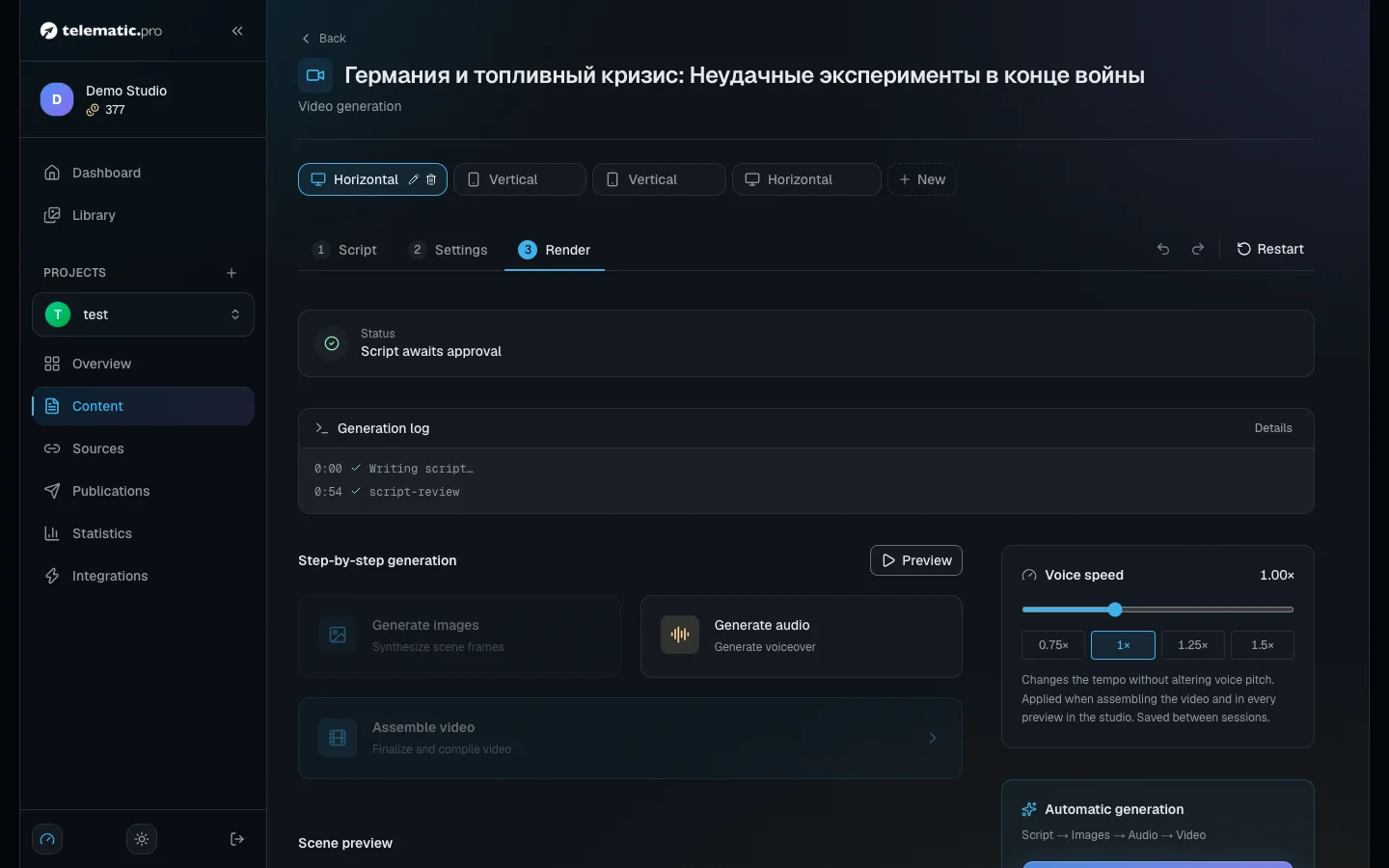
Tip. If the "Made with telematic.pro" + cashback box is ticked in the video settings, 5 % of the build cost comes back for every finished video, but no more than 5 tokens.
Worked examples
A post from a Telegram channel to your channel on a schedule: collection 1 + a post for the platform 1 + publishing 1 = 3 tokens.
An article from a website going straight to Telegram and VK, with auto-analysis: collection 1 + analysis 1 + two posts at 1 each + two publications at 1 each = 6 tokens.
A month of a channel, two posts a day from RSS: 60 × (1 + 1 + 1) = 180 tokens.
A vertical 60-second video with the Nano Banana 2 Lite model: 6 frames × 5 + voiceover 15 + build 60 + cover 5 = 110 tokens.
A 3-minute video with the Nano Banana 2.1 model: 18 frames × 6 + voiceover 45 + build 180 + cover 8 = 341 tokens.
The examples assume the default text model and one scene per 10 seconds of video.
Promo codes and the partner programme
A promo code. On the "Account" page find the "Have a promo code?" card, type the code and click "Apply". There are two kinds of code:
- for tokens — your balance goes up straight away;
- for a percentage on a top-up — the bonus arrives with your first paid top-up, and only with it.
One code works once per account. A code may have an expiry date and a limit on how many times it can be used. A token code only works in an account with a confirmed e-mail. If you log in through Telegram and the code is refused, write to support.
The partner programme. On the same page, in the "Partner program" block, copy the link from the "Your invite link" field and share it.
- You get 50 tokens when your friend confirms their e-mail or signs up through Telegram.
- You get 10 % of the tokens from each of their top-ups, rounded down.
- Your friend gets 25 tokens on top of the starting 50.
The first partner link that brought the person to the site is the one that counts. The "Your referrals" and "Your earnings" counters and the "Referral history" list are in the same block.
Keep an eye on your balance: the history and an empty balance
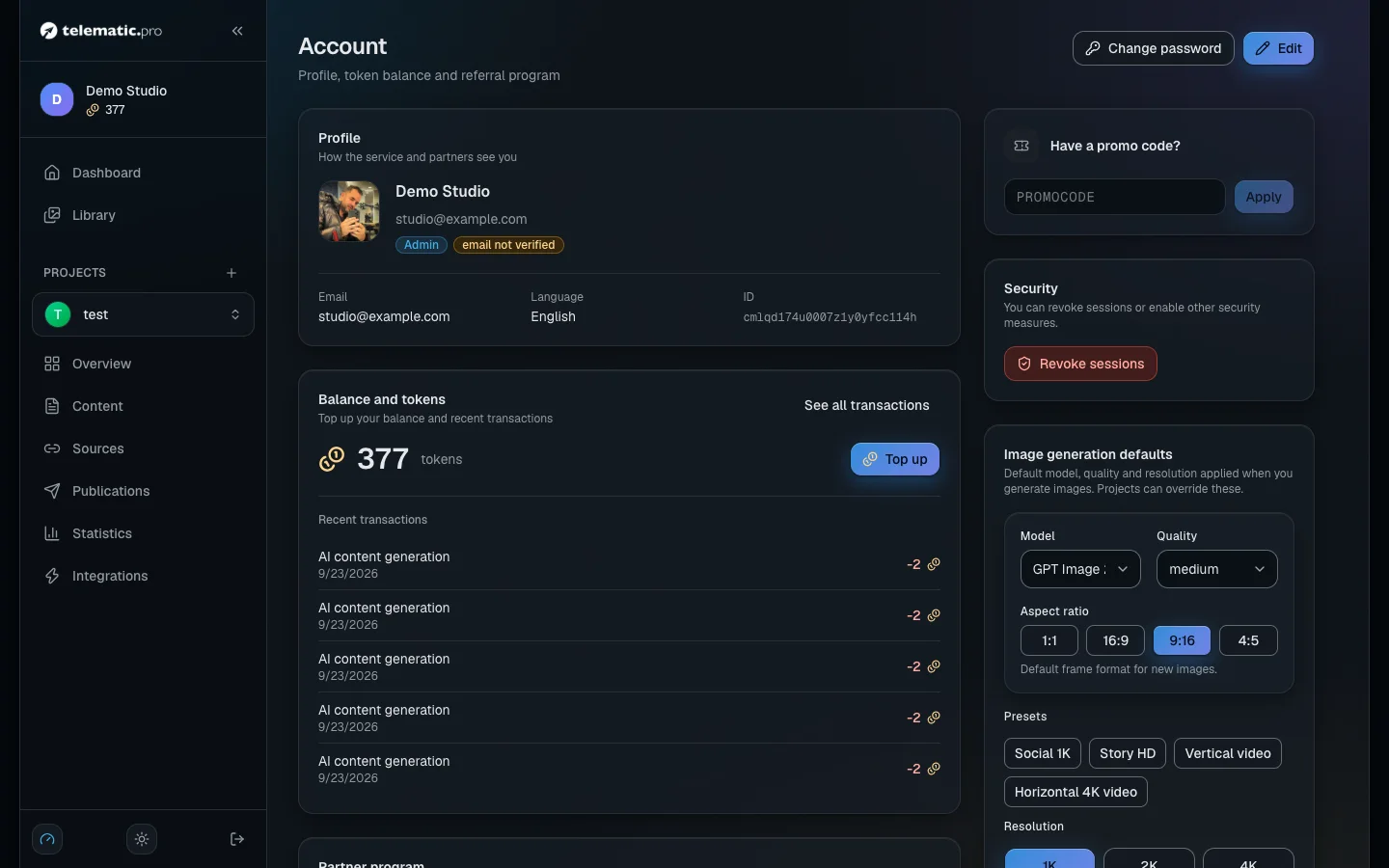
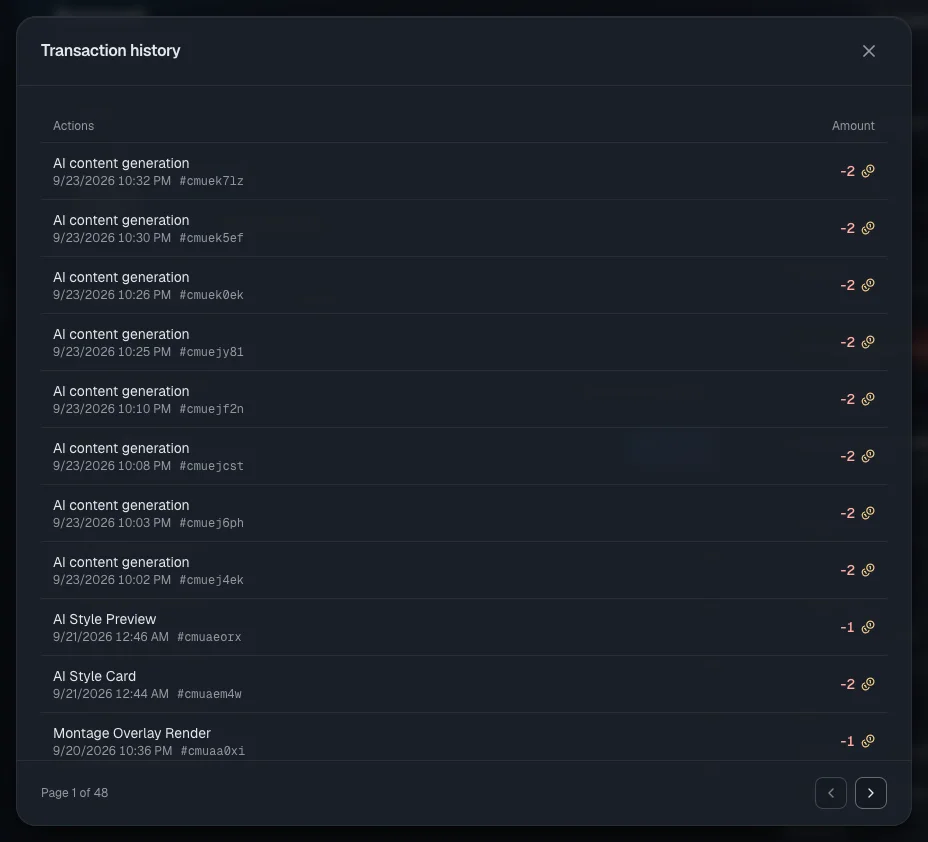
The history. On the "Account" page, "Recent transactions" are shown under the balance. The "See all transactions" link opens the "Transaction history" window: 15 lines per page, with credits in green with a "+" and charges in red.
There are no filters and no export. Some lines are still shown in English: Promo code, Referral welcome bonus, Attribution cashback (the money back for a video), and the Montage lines.
If a charge looks wrong, write to support: Telegram @protoplex1 or support@telematic.pro.
If you do not have enough tokens for an action you start yourself, it does not begin and nothing is charged. You will see the message "Insufficient balance"; in the video studio and during a manual collection the text comes in English: Insufficient token balance.
Before a full video build the service checks in advance whether the balance covers the frames, the voiceover and the build.
If you run out of tokens while things are running on a schedule:
- Collection from a source does not happen, and a run with the "Skipped" status appears in the log. This does not count as an error. After three such skips in a row the source's schedule pauses and a yellow "Out of tokens — top up to resume" link appears on the source page.
- Scheduled publishing skips its interval. The item stays in the queue and goes out in one of the next intervals once you top up.
- You get up to three reminders: immediately, after 2 days and after another 7 days. They come by e-mail and in Telegram, if you have started the service bot.
After a top-up there is nothing to switch on by hand. The service checks the balance once a minute, takes the sources off pause itself and starts collecting right away.
What next
- Quick start — go through the first steps and collect the starting rewards.
- Content sources — how to set up collection so you do not pay for anything you do not need.
- Video: script and scenes — what a video is made of and what makes up its price.
- Troubleshooting — if collection has stopped or a post did not go out.