

By the end of this article your Telegram channel will have its first post prepared by the service, and new ones will keep coming out on a schedule. The whole thing takes about 20 minutes. All you need is a browser and a channel where you are an administrator.
The first post costs about 3 tokens. You get 50 tokens when you sign up, so there is nothing to pay.
Sign up
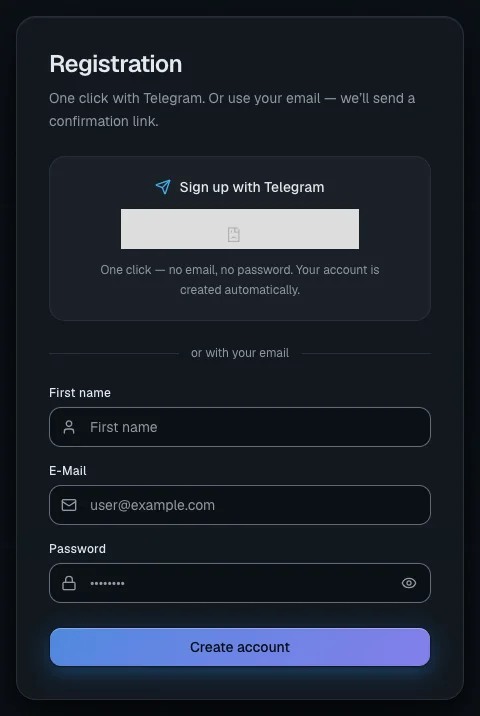
- On the home page click "Try it free" — the "Registration" page opens.
- The fastest way is the "Sign up with Telegram" block at the top of the page. Click the Telegram button and confirm the login in the messenger. Your account is created right away, with no e-mail or password.
- If e-mail suits you better, fill in "First name", "E-Mail" and "Password" (at least 6 characters) below the "or with your email" divider and click "Create account".
- When you sign up by e-mail, the "Check your email" card appears. Open the e-mail and follow the link — it is valid for 24 hours. No e-mail? Click "Resend verification" (the button works once a minute).
Once you have logged in through Telegram or confirmed your e-mail, you land in your account and 50 tokens arrive on your balance.
Important. When you sign up by e-mail, the tokens are only credited after you follow the link from the e-mail. Until your e-mail is confirmed, your balance is zero.
Create a project
A project is the workspace for one channel or one topic. Each project has its own sources, its own connected platforms and its own text settings.
- In the menu on the left find the "Projects" group and click the "+" next to it (the tooltip says "Create project").
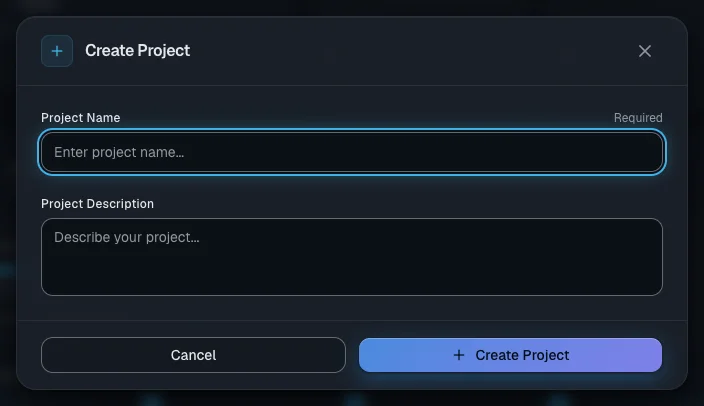
- In the "Create Project" window fill in "Project Name" — for example, after the topic of your channel. "Project Description" can wait until later, but it helps the AI understand what the channel is about.
- Click "Create Project". The message "Project created" appears.
- The window does not open the project for you. Click the project switcher in the menu on the left (it says "Select a project") and pick your new project.
Creating a project is free. Your first project earns you a reward — it is one of the achievements listed on the dashboard.
Tip. Set the language of your posts straight away: on the project page click the "AI Settings" panel and choose "Content Language". There is more on this in Projects and platforms.
Connect your Telegram channel
Your Telegram password is not needed: you add the service bot as an administrator of your own channel.
- In the project menu open the "Integrations" section and click "Add Telegram".
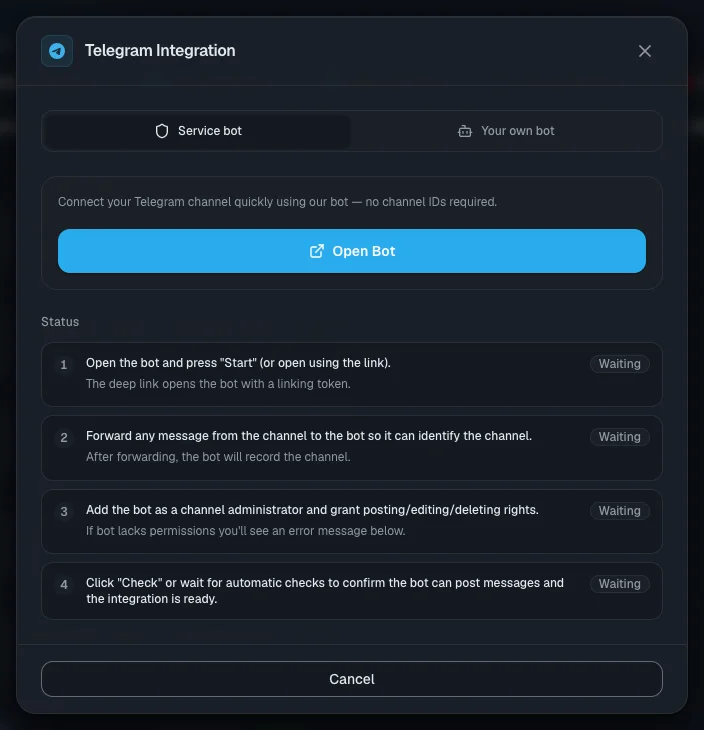
- In the "Telegram Integration" window stay on the "Service bot" tab and click "Open Bot". The bot opens in Telegram — press Start there.
- Forward any message from your channel to the bot. That is how the bot learns which channel you are connecting.
- In your channel settings in Telegram add the bot as an administrator and allow it to post, edit and delete messages.
- Go back to the connection window. Each of the four steps should now say "Done". The check runs by itself every few seconds; if you would rather not wait, click "Check status".
- When the message "Channel linked successfully" appears, click "Finish".
If a red "Configuration issue detected" frame appears, the bot is missing rights in the channel. Fix the rights in Telegram and click "Check status" again.
Add your first source
A source is a place the service takes topics from. For your first one, take a public Telegram channel on your topic.
- In the project menu open "Sources" and click "Add source".
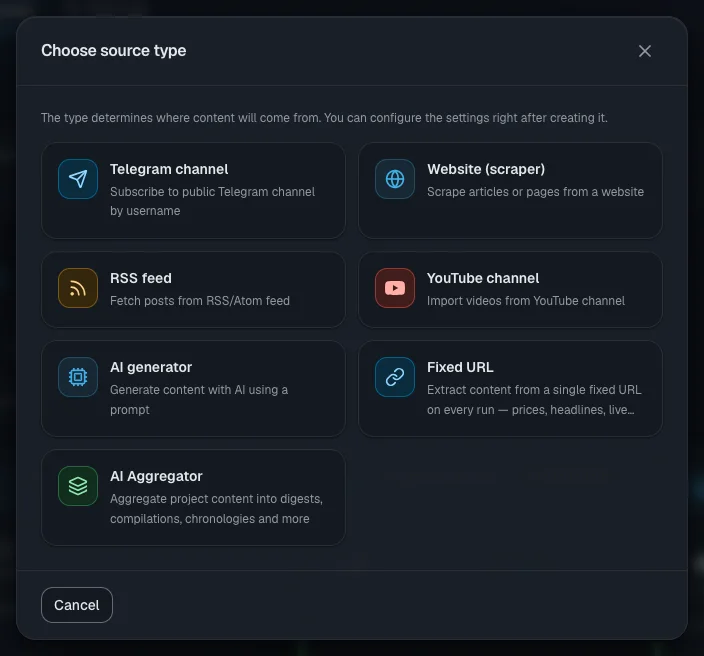
- In the "Choose source type" window choose "Telegram channel".
- Fill in "Source Name" and click "Create". The source page opens.
- On the "Settings" tab type the channel name into the "Channel username" field, for example
@channel, and click "Save". - Click "Test". The mark "Channel is reachable" should appear.
Important. The service only reads public channels. A private channel or a personal chat cannot be connected as a source.
The other source types — websites, RSS, YouTube channels, the AI generator — are covered in Content sources.
Collect an item and save it as a draft
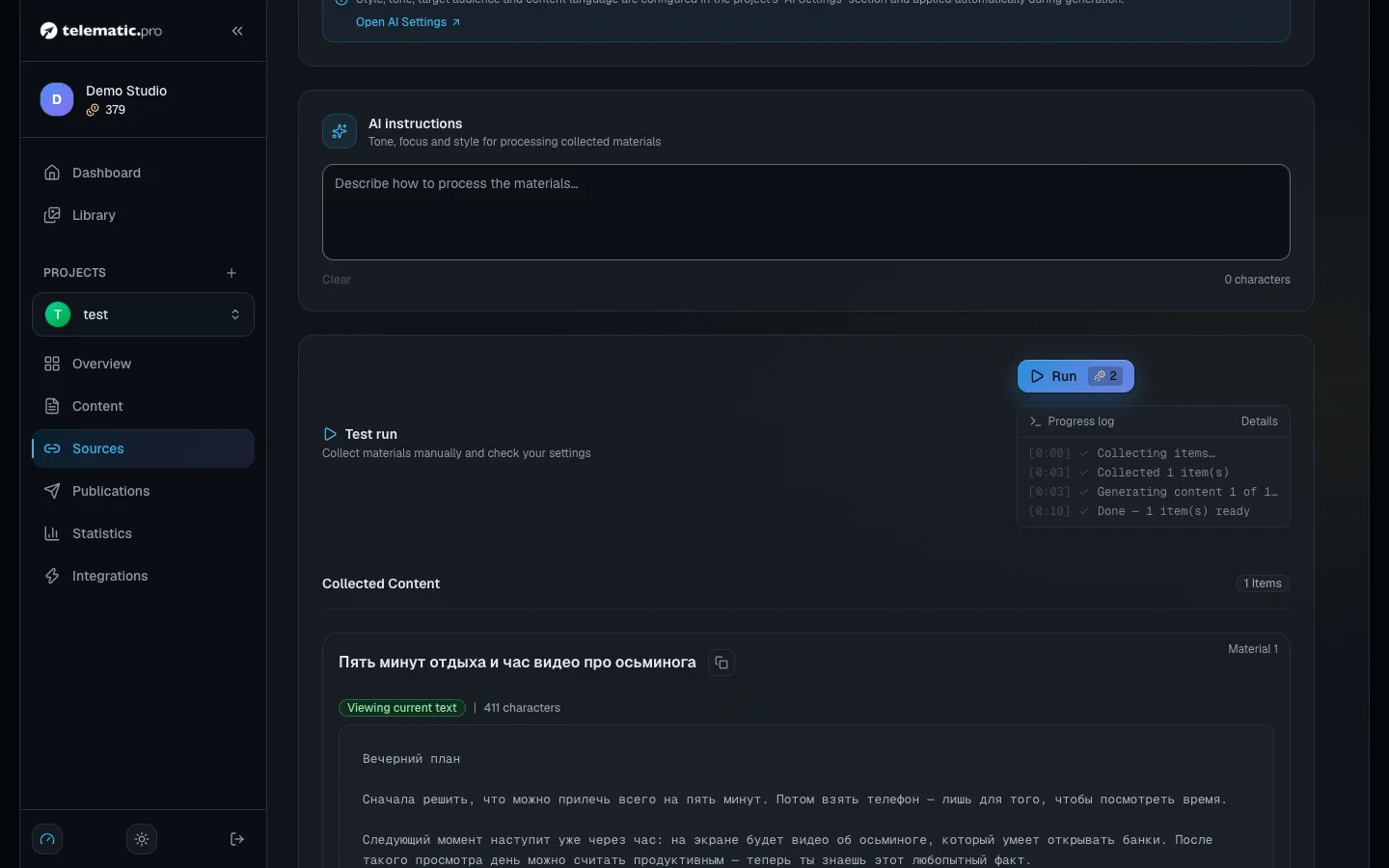
- On the same source page find the "Test run" block and click "Run". The price is shown on the button.
- Wait for the run to finish — you can follow it in the log under the button. The service takes the channel's latest post, and the AI rewrites it in its own words according to your project settings.
- A card with the item appears in the "Collected Content" block. Read the text and click "Create draft".
- A message with the "View content →" link appears — the item is now in the "Content" section.
If the item is not a good fit, click "Reject" and the service will stop collecting it. The "Remove" button only hides the card: on the next run the same post is collected again, and tokens are charged for it again.
What it costs. 1 token for a post collected from a Telegram channel (with the default model). If no new posts are found, the run costs 1 token.
Approve the item and check the post
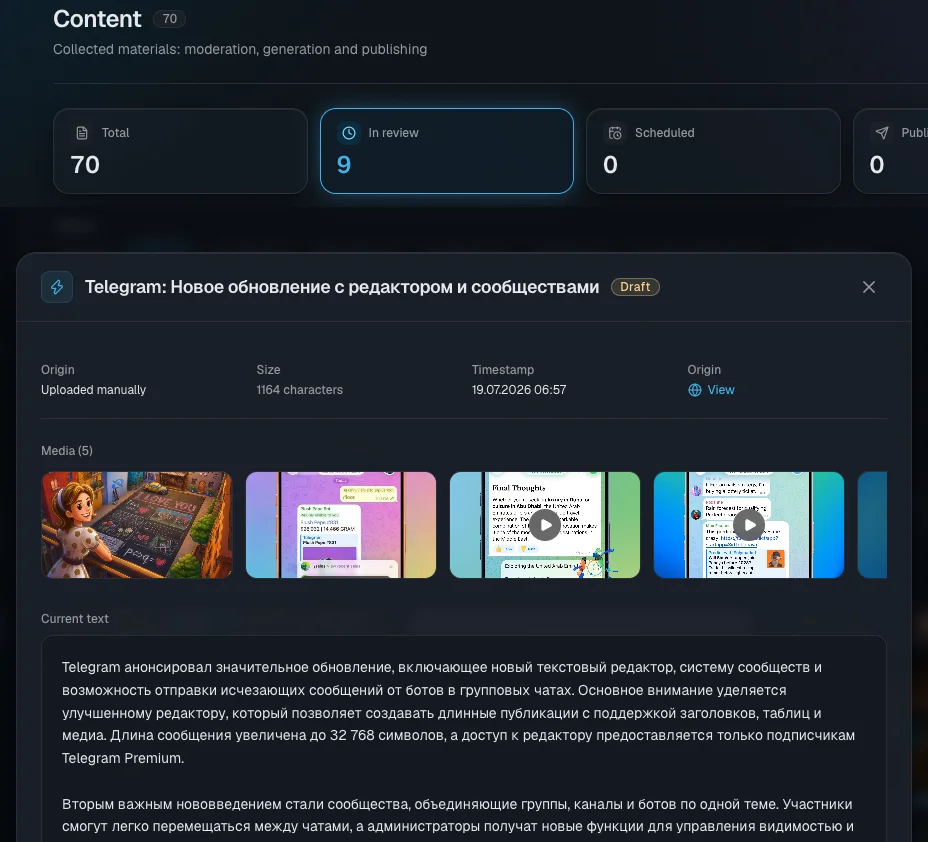
- Open the "Content" section and click the card with the "Draft" status. A preview window opens.
- Click "Approve". The number on the button shows how many platforms a post will be written for. Right now that is 1 — your Telegram channel.
- Click the card once more. This time the item's own page opens.
- Go to the "Platform versions" tab. When the AI is done, the finished post text appears in the Telegram card.
- To change something, open the "Actions" menu in the platform card (the three-dot button) and choose "Edit".
What it costs. 1 token for a post for one platform with the default model; with a stronger one — from 2 tokens, the price is shown next to the model. Reading and editing by hand are free.
Publish the post
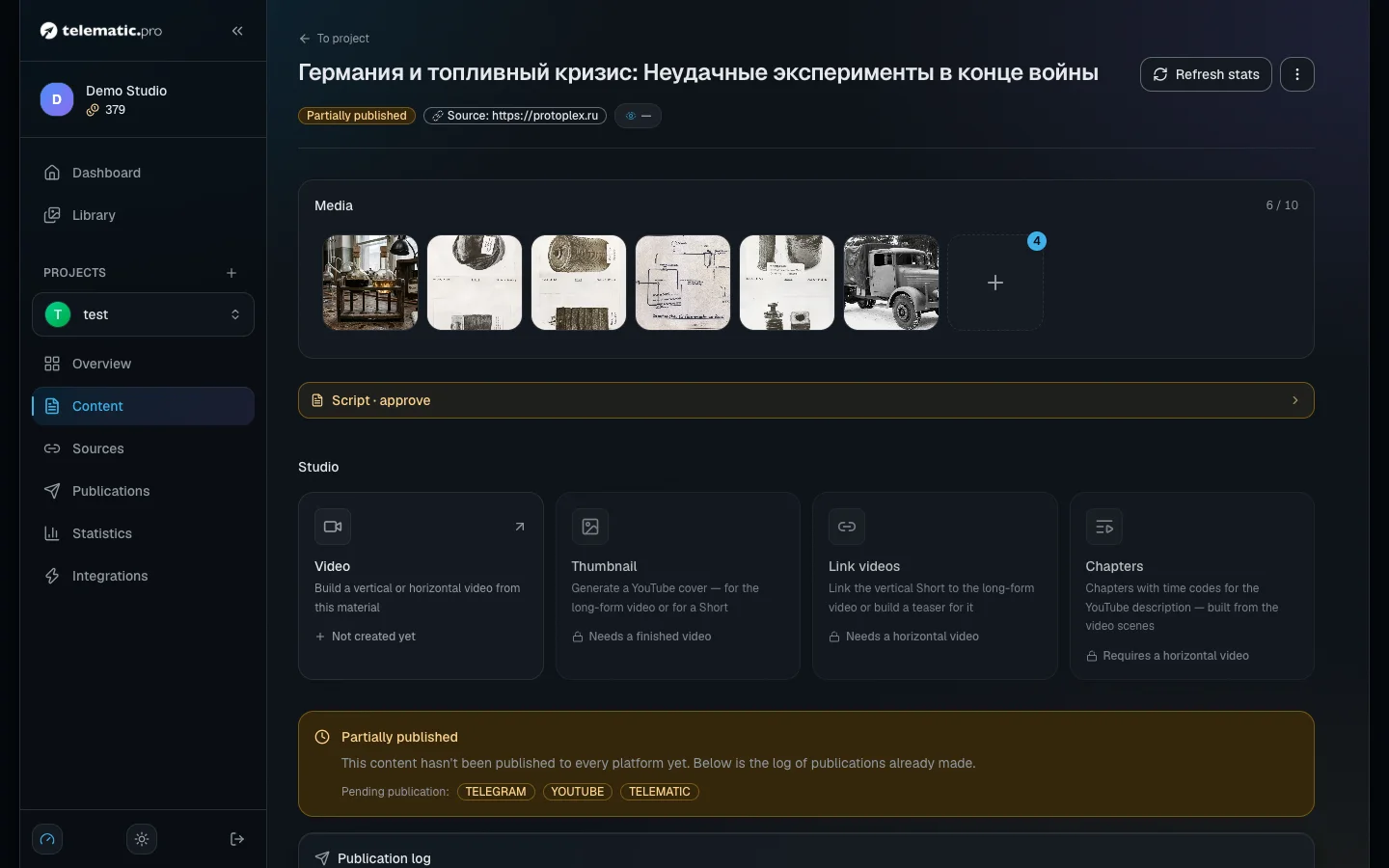
- On the item page click "Publish" in the header. The post goes out to every connected platform.
- Wait for the "Content published successfully" message.
- A line with the result appears in the "Publication log" block. The "View post" button opens the post in your channel.
What it costs. Publishing by hand is free.
If you get an error instead, read its text in the log and open Troubleshooting.
Turn the schedule on
To let the channel run itself, turn on two schedules: collecting items and sending posts out.
Collecting. On the source page open the "Automation" tab, choose "Run interval" and click "Enable automation". The first run happens after one full interval. Collected items arrive as drafts. To have them approved automatically, turn on "Auto-accept content from automated runs".
Sending posts out.
- In the project menu open "Publications" and go to the "Automation" tab.
- Click "Configure parameters".
- Set "Run interval" — for example, "Every 1 hour".
- In the "Operational Window" field give the hours when posts may go out.
- Fill in "Max posts per day" and click "Save".
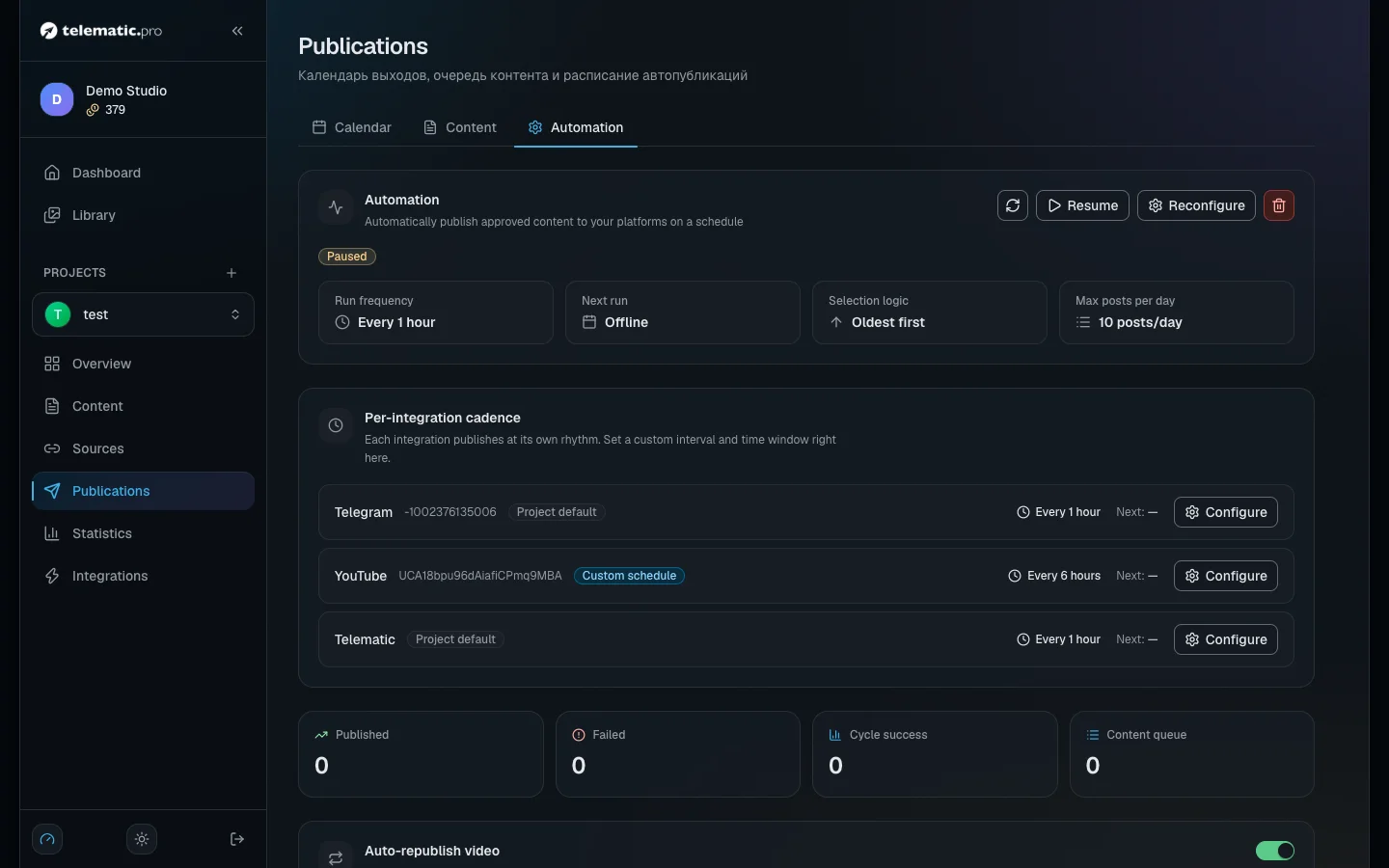
From now on every approved item joins the queue. One item goes out per interval — within the hours you set and the daily limit.
What it costs. 1 token for each platform a post went out to on schedule. A scheduled run costs the same as a manual one.
What next
- Projects and platforms — YouTube, VK, TikTok, your own bot and the settings of each platform.
- Content sources — websites, RSS, the AI generator, filters and automatic selection.
- Video: script and scenes — videos with a voiceover made from your items. Video and AI images open up after your first top-up.
- Tokens and payment — the full price list and free tokens for your first steps.