

By the end of this article you will have a project with its text style set up and platforms connected for publishing. Each platform takes 3–10 minutes. Creating projects, connecting platforms and saving settings are free.
Telegram, YouTube (regular videos and Shorts), VK (text and photos), TikTok and your own website are open to everyone right now.
Create a project and switch between projects
A project is the workspace for one channel or one topic. There is no separate page listing your projects: they live in the switcher in the menu on the left.
- Click the "+" next to the "Projects" heading, or open the project switcher and choose the bottom line, "Create project".
- Fill in "Project Name" and, if you like, "Project Description". Click "Create Project".
- Open the project from the switcher. The current project has a check mark. Once you have more than six projects, a "Search projects…" field appears in the switcher.
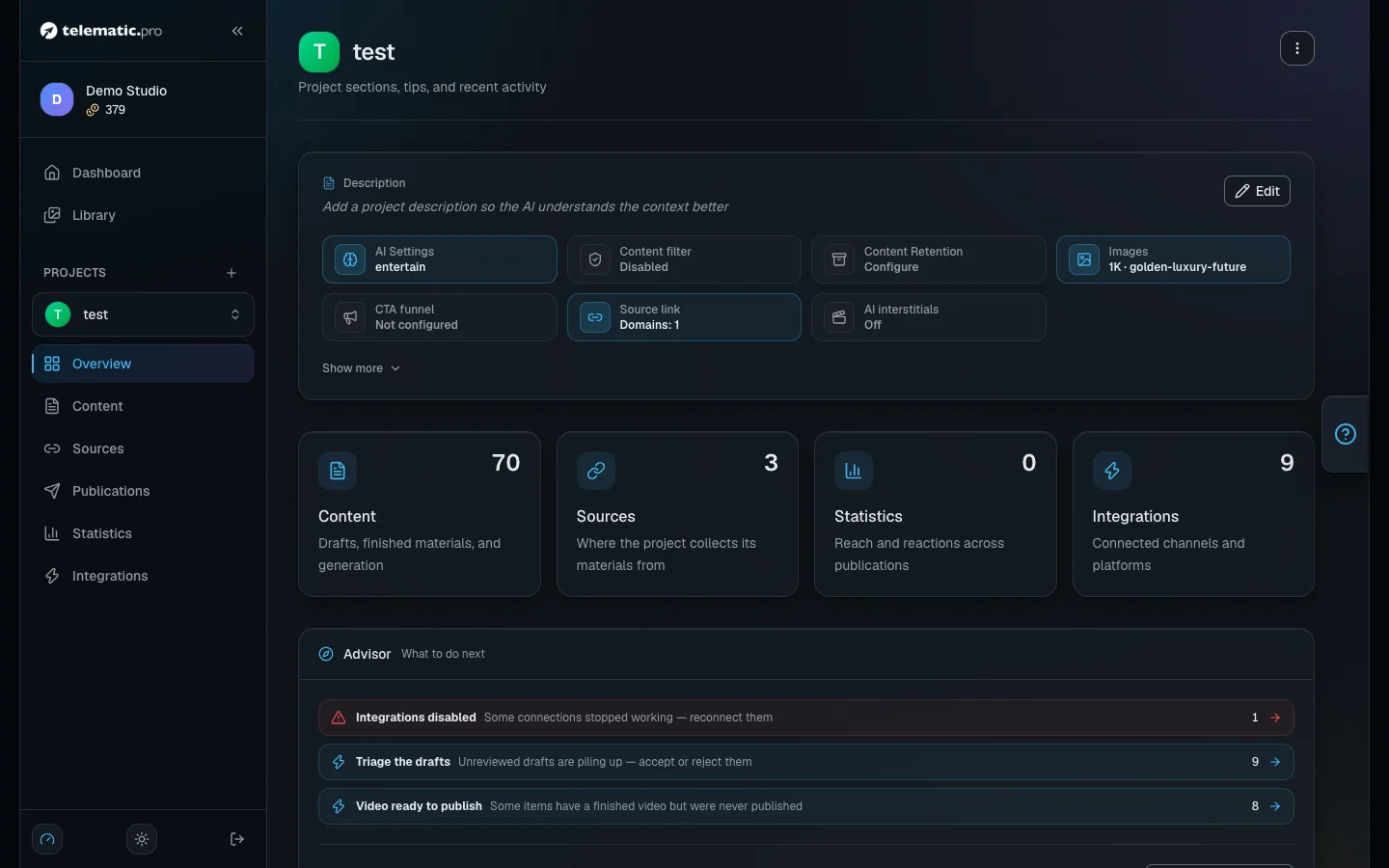
The project menu has six sections: the overview, "Content", "Sources", "Publications", "Statistics" and "Integrations".
On the overview page, under the project name, there is a row of panels: "AI Settings", "Content filter", "Content Retention", "Images", "CTA funnel", "Source link", "AI interstitials". Each one opens its own settings window. The three-dot button to the right of the name opens the project menu.
Tell the AI who it is writing for and how
These settings affect every text in the project. None of the fields are required, but the more precise they are, the less you will have to fix later.
- On the project page click the "AI Settings" panel.
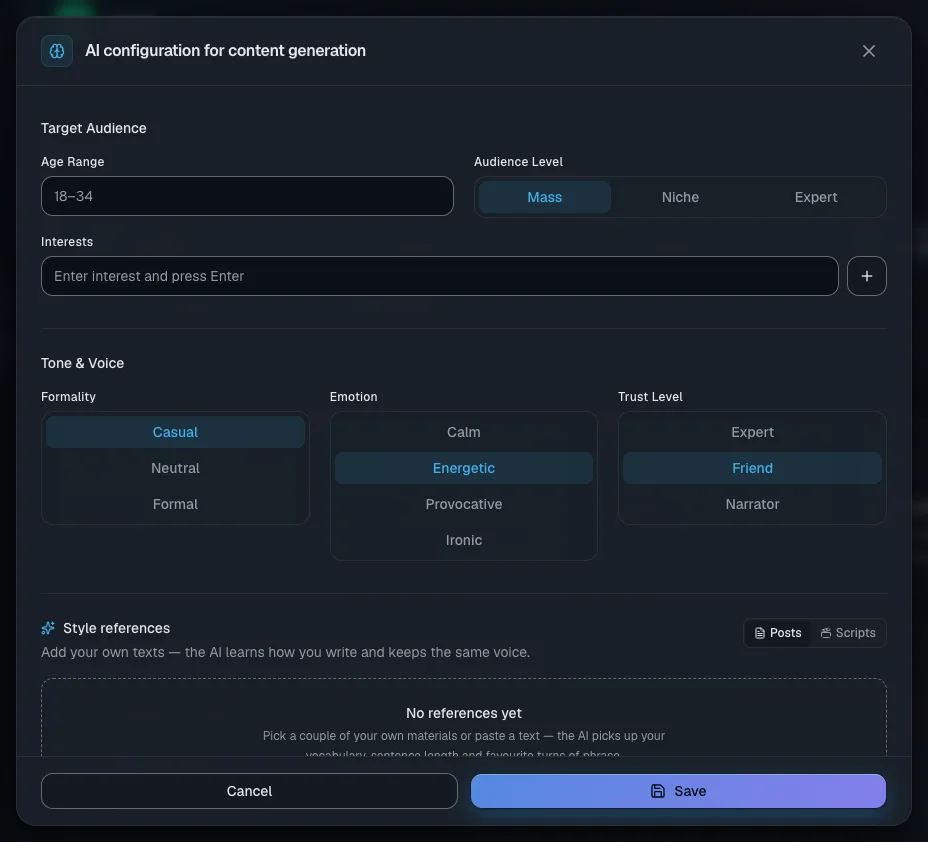
- In the "Target Audience" block set "Age Range", "Audience Level" and "Interests" (type a word and press Enter).
- In the "Tone & Voice" block choose "Formality", "Emotion" and "Trust Level".
- Choose "Content Language": EN, DE, FR, IT or RU. Posts will come out in that language even if the source is in another one.
- Choose "Content Goal" and "Default AI model". Each model shows its price: the stronger ones cost more.
- Click "Save". The message "Project updated" appears.
Tip. Fill in "Description" on the project page as well: the AI uses it to work out what the channel is about.
Connect Telegram
Open the "Integrations" section and click "Add Telegram". The "Telegram Integration" window has two tabs.
"Service bot" is the simplest route:
- Click "Open Bot" and press Start in Telegram.
- Forward any message from your channel to the bot.
- Add the bot as an administrator of the channel, with the right to post, edit and delete messages.
- Wait for all four steps to show "Done" (or click "Check status") and click "Finish".
If the bot has closed, click "Re-open Bot". The "Cancel" button stops the connection.
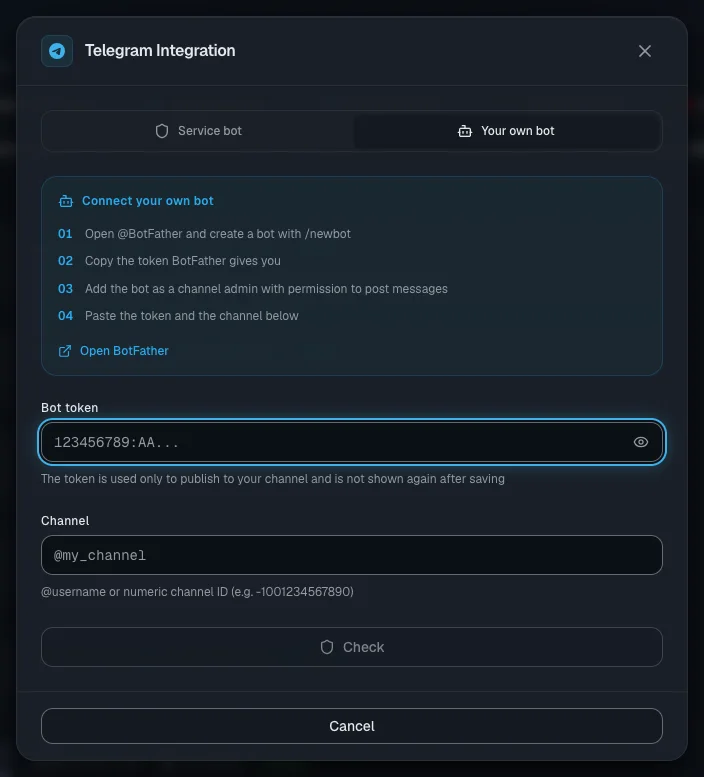
"Your own bot" is for channels with a lot of posts. The shared bot splits Telegram's message-rate limits across all users, while your own bot's limits are yours alone.
- In Telegram open @BotFather, send the
/newbotcommand and copy the new bot's token. - Add this bot as an administrator of the channel, with the right to post.
- On the tab fill in "Bot token" and "Channel" — the channel's
@usernameor its numeric ID. - Click "Check". The "Channel admin" and "Can post" marks should light up.
- Click "Connect". The message "Channel connected" appears.
Important. Telegram allows up to 1024 characters in an image caption, up to 4096 in a message without media, and up to 50 MB for a video. What happens to a longer text is set in the platform settings (see below).
Connect YouTube
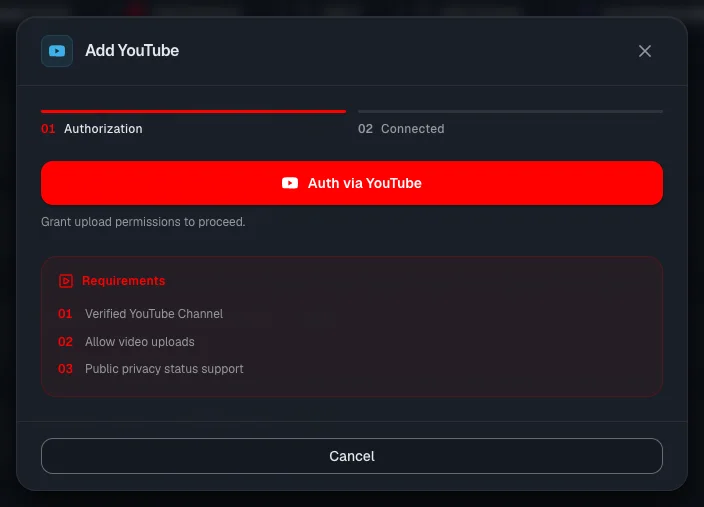
- In the "Integrations" section click "Add YouTube".
- Read the "Requirements" block and click "Auth via YouTube". A Google window opens — allow pop-ups in your browser.
- Choose your Google account and tick every permission it asks for: uploading videos, viewing the channel, comments.
- The window closes by itself. The status "Connection established" and the message "YouTube channel connected successfully!" appear.
The first channel of the account you chose is connected. The service never sees your Google password.
What matters when publishing to YouTube:
- A video is required. An item without a video does not go out to YouTube.
- Videos are published as public. The title is the first line of the text, up to 100 characters; the description is up to 5000.
- A vertical or square video up to 3 minutes long goes out as a Short. If an item has both formats, the horizontal video goes out first, then the Short with a link to it.
- If the video has a cover image, it is set at publishing time.
Connect VK
VK is connected with a community access key. Your VK password is not needed.
- Click "Add VKontakte". The "How to get a community token?" hint and the "Open my VK communities" link are right there in the window.
- In VK open community management → "Settings" → "API usage" and create an access key with the rights to manage the wall and photos. Copy the key.
- Paste the key into the "Community token" field and click "Validate token".
- Check the "Access permissions" block: "Wall posting" and "Photo upload" must be on.
- Click "Connect community". The message "Community connected!" appears.
In VK the service posts to the wall: text up to 16,384 characters and up to 10 images. The service does not publish video to VK.
Important. If the key has no right to photos, or an image fails to upload, the post goes out without images and you will not see an error. Check the key's rights in advance.
Connect TikTok and your own website
TikTok.
- Click "Add TikTok".
- Choose "Post Mode". The "Upload to Inbox" option is selected by default: the video lands in your TikTok inbox and you publish it yourself in the app.
- Click "Connect with TikTok" and confirm access in the TikTok pop-up.
Only a vertical video up to 10 minutes long goes to TikTok. If there is no video but there are images, a photo carousel goes out instead. TikTok does not accept a text-only item. The caption is up to 2200 characters, and links in it are not clickable.
Your own website.
- Click "Add Site Feed" — the "Connect an external site" window opens.
- Fill in "Site name" and click "Generate key".
- Copy the key from the "Your secret key" block straight away: it is shown only once.
From then on your website pulls finished items with that key. How to set that up is described in Website integration.
Set up publishing for each platform
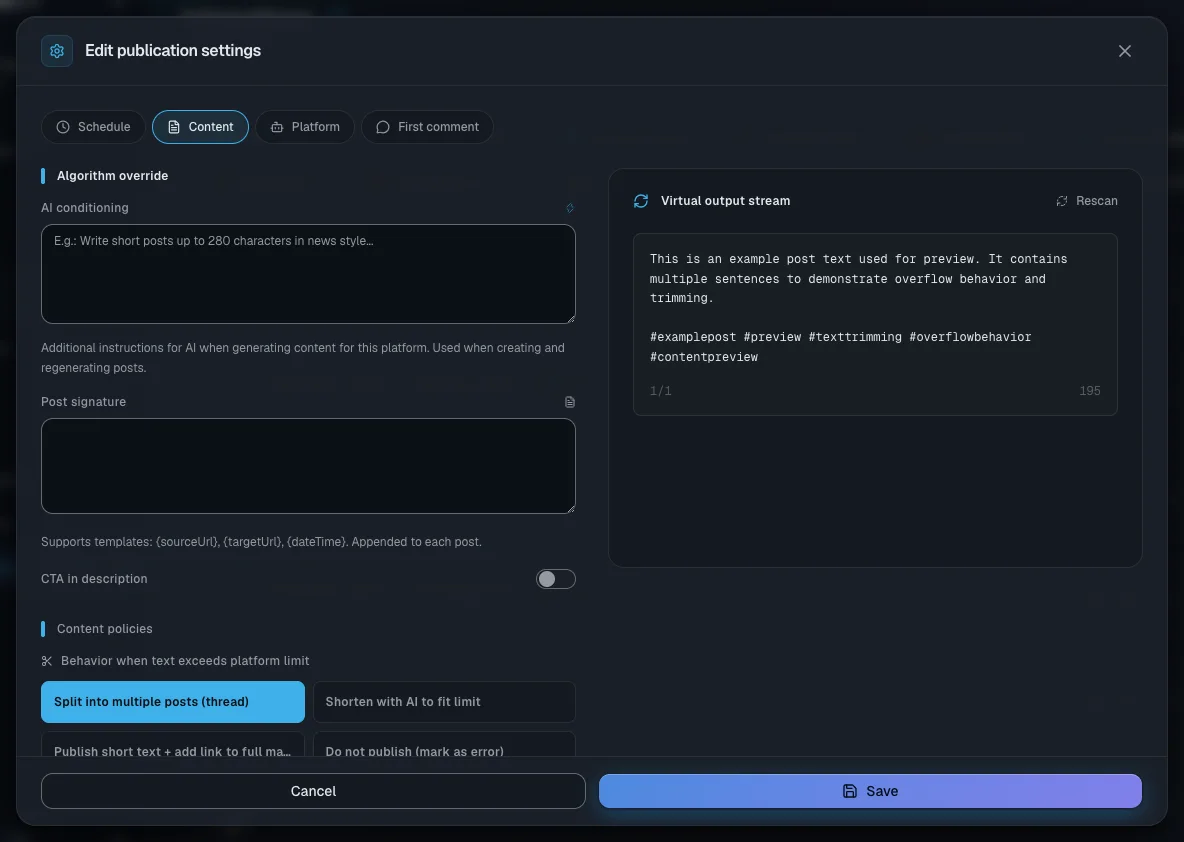
Click a platform card or the "Edit publication settings" gear. The window has up to four tabs. Changes only take effect after you click "Save".
- "Schedule". The "Publishing rhythm" field: the platform publishes at the project's pace or at its own. For "Custom rhythm", set an interval (from 5 minutes to 30 days) and "Operational Window". A clock icon appears on the card. As long as the project has no publication schedule turned on, nothing goes out on schedule — see Publications and calendar.
- "Content". "AI conditioning" — extra instructions to the AI for this platform. "Post signature" — a fixed signature under the post. "Behavior when text exceeds platform limit" — what to do with a long text (see the table below). The same tab holds required hashtags, "Generate hashtags automatically", "Emoji usage", "Output language" and "Append source link". On the right is "Post preview": a sample post that updates after every change.
- "Platform" (Telegram and TikTok). For Telegram — "Publishing bot", with the buttons "Use your own bot", "Replace" and "Detach". For TikTok — the publishing mode.
- "First comment" (YouTube and Telegram). Turn on "Enable first comment" and the service will leave a comment under each new post: written by the AI or from your template. In Telegram this needs a discussion group the bot belongs to — check it with the "Check discussion group" button.
| If the text is longer than the platform's limit | What happens |
|---|---|
| "Split into multiple posts (thread)" | The text goes out as several posts in a row. Selected by default |
| "Shorten with AI to fit limit" | The AI shortens the text to the limit |
| "Publish short text + add link to full material" | A short text goes out with a link to the full item |
| "Do not publish (mark as error)" | The post does not go out and an error appears in the log |
Pausing, refreshing, deleting and moving
Every platform card has a row of icon buttons.
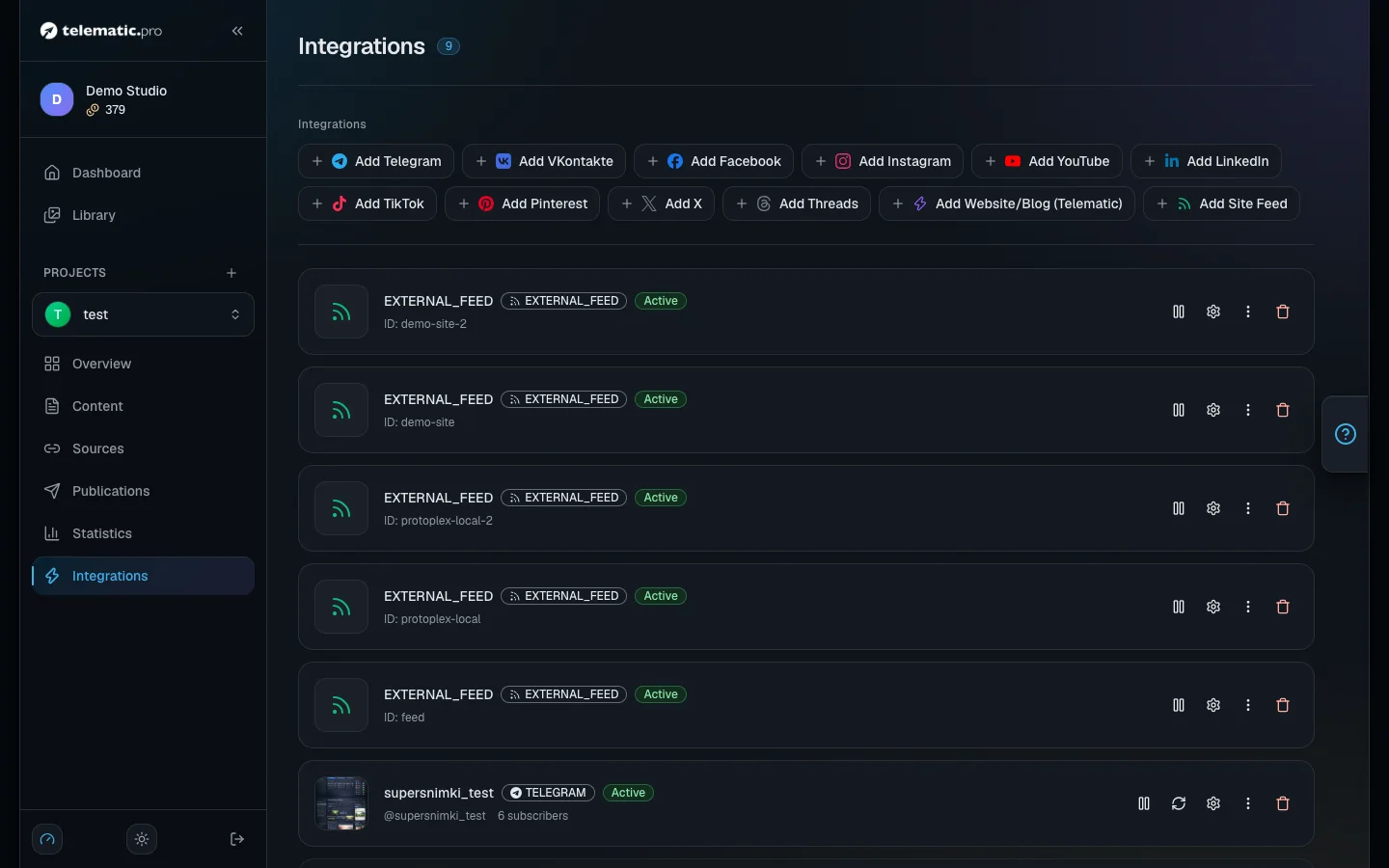
- Pause and start — the pause or triangle icon. While paused, the platform gets the "Disconnected" status and no posts go out to it. The other platforms carry on as before.
- "Refresh" — reloads the name, the avatar and the subscriber count. Once an hour at most.
- "Copy or move" — "Copy to project…" or "Move to project…". A copy publishes to the same channel with the same rights. When you move a platform, its settings, publishing history and statistics move with it, and posts for it that have not gone out yet are deleted in the old project.
- The bin — deletes the connection after you confirm in the "Delete integration" window. The channel itself is not changed.
The "Reconnect required" badge means access has expired or been revoked. Connect the platform again. For YouTube it is enough to click the refresh icon on the card — the Google login window opens.
A whole project is copied from the project menu:
- Choose "Duplicate project" and set "New project name".
- In the "Also copy" list keep the ticks on whatever the copy needs.
- Click "Create copy".
Settings are always copied; items and publications never are. The "Import settings from project" entry works differently: it brings selected groups of settings from another project into the current one and replaces yours with them.
Important. Copied sources and schedules stay switched on: the copy will start collecting items, spending tokens and publishing to the same channels right away. If that is not what you want, clear the "Sources" and "Integrations" ticks.
The "Delete" entry in the project menu deletes the project along with all its items, with no way to restore them.
What next
- Content sources — where the project will take its topics from.
- Publications and calendar — the schedule posts go out on.
- Website integration — how your website pulls items with a key.
- Troubleshooting — if a platform will not connect or a post does not go out.